

DWPA/Enhanced Catalog
 |
| - Documents & Functions |
- Partner IT - Work Order Workflow
Partner IT - Work Order Workflow
Overview
The Partner IT Work Order Workflow provides an easy, consistent method for creating work order workflows in DWPA. The workflow is called through a Call Activity step, in the same fashion as the approval process, with the 7 required fields being set through values found in the Service Broker Context variable and the name of a Work Order Template.
Features
- Single-step creation of work order fulfillment records
- Handles the implementation and response handling of managerial and adhoc approvals with each approval being bypassable
- Automatic Notes/Description based on the questions and answers in your service
- Handles Detail tab data for the first 20 questions
- Ability to add attachments to your Work Order
- Set your Work Order Summary or have it populated with your Work Order Template
Interface
| Input Map | Data Type | Value |
|---|---|---|
| Required | ||
| Correlation ID | GUID | General > Process Correlation ID |
| Requested For User ID | Text | context > Requested For > Login Name |
| Request By User ID | Text | context > Request By > Login Name |
| Work Order Template | Text | Name of the Work Order Template used by the Work Order, in quotes |
| Request ID | Text | context > Service Request > Service Request ID |
| Service Name | Text | context > Service > Service Name |
| QuestionsAndAnswers | JSON | context > Questions and Answers |
| Approvals | ||
| Bypass Manager Approval | Boolean | "true", "false" |
| Bypass Adhoc Approval | Boolean | "true", "false" |
| Adhoc Approver | Text | Remedy Login ID of the approver |
| Optional | ||
| Summary | Text | If left blank, the Summary from the Work Order Template will be used. Text greater than 100 characters will be truncated at the 97th character and '...' is appended to the Summary supplied. |
| Description | Text | If left blank, a Description will be created from the Questions and Answers. |
| Attachment | Text | Attachments are uploaded to the Helix server and stored as MIME text. |
| Details | ||
| Details Value 01 - text | Text | |
| Details Value 02 - text | Text | |
| Details Value 03 - text | Text | |
| Details Value 04 - text | Text | |
| Details Value 05 - text | Text | |
| Details Value 06 - datetime | Date/Time | |
| Details Value 07 - datetime | Date/Time | |
| Details Value 08 - integer | Integer | |
| Details Value 09 - integer | Integer | |
| Details Value 10 - text | Text | |
| Details Value 11 - text | Text | |
| Details Value 12 - text | Text | |
| Details Value 13 - text | Text | |
| Details Value 14 - text | Text | |
| Details Value 15 - text | Text | |
| Details Value 16 - text | Text | |
| Details Value 17 - text | Text | |
| Details Value 18 - text | Text | |
| Details Value 19 - text | Text | |
| Details Value 20 - text | Text | |
Example
- Drag a Call Activity step onto the canvas
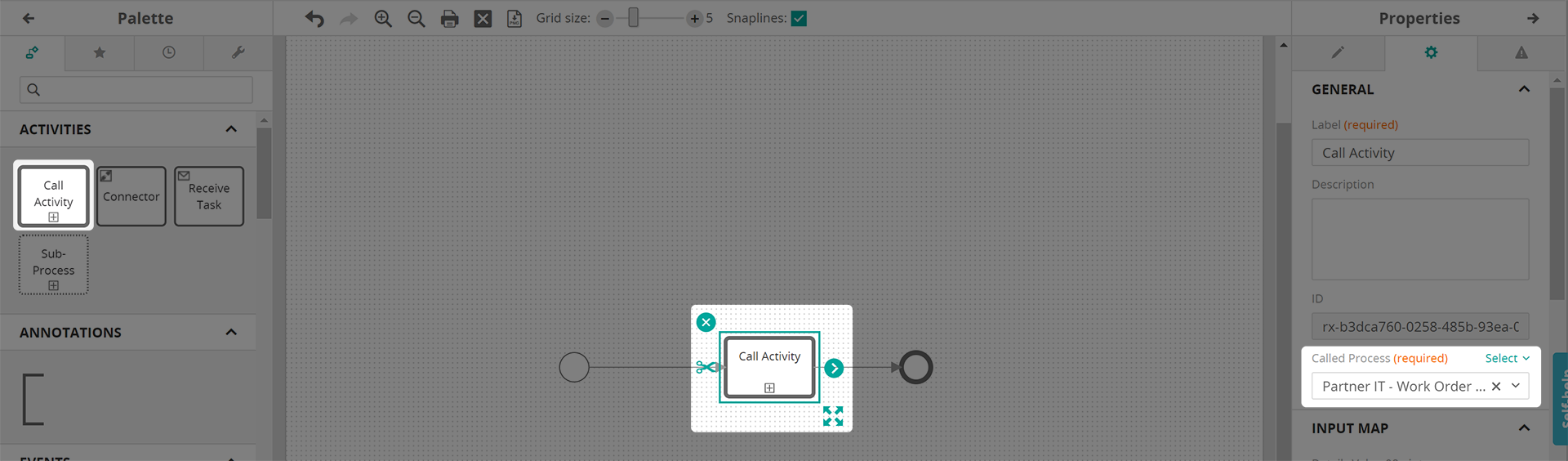
- In the Called Process dropdown, select
*Partner IT - Work Order Workflow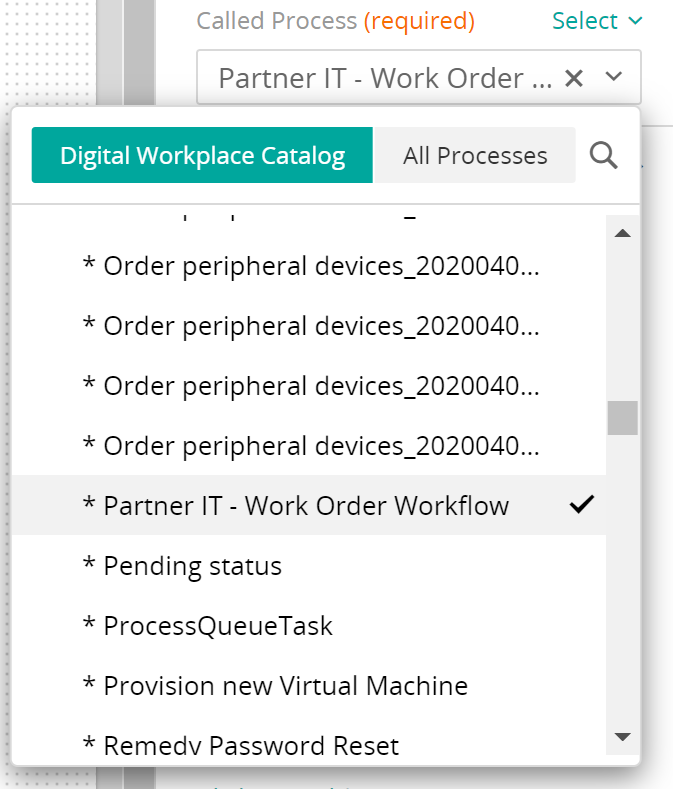
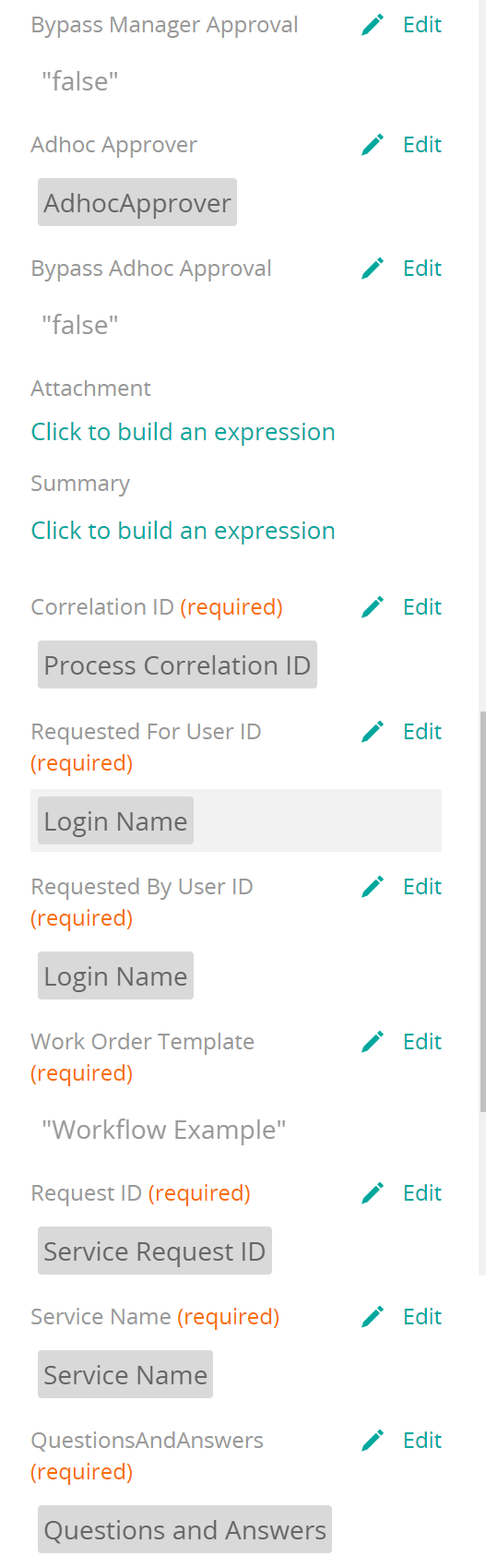
- Fill in properties using values from your questionairre and the context variable. At a minimum, the required properities need to be filled in. With the exception of the
Work Order Templateproperty which needs to be the name of the work order template used for this request, the required fields can be populated with values from yourcontextvariable.
Installation & Setup
Files Needed
 PartnerIT_WorkOrder.zip -- DWPA import file SB-AdhocApprovalProcess_1.zip -- Deployment Manager import file
Installing the Adhoc approval process
- Download SB-AdhocApprovalProcess_1.zip
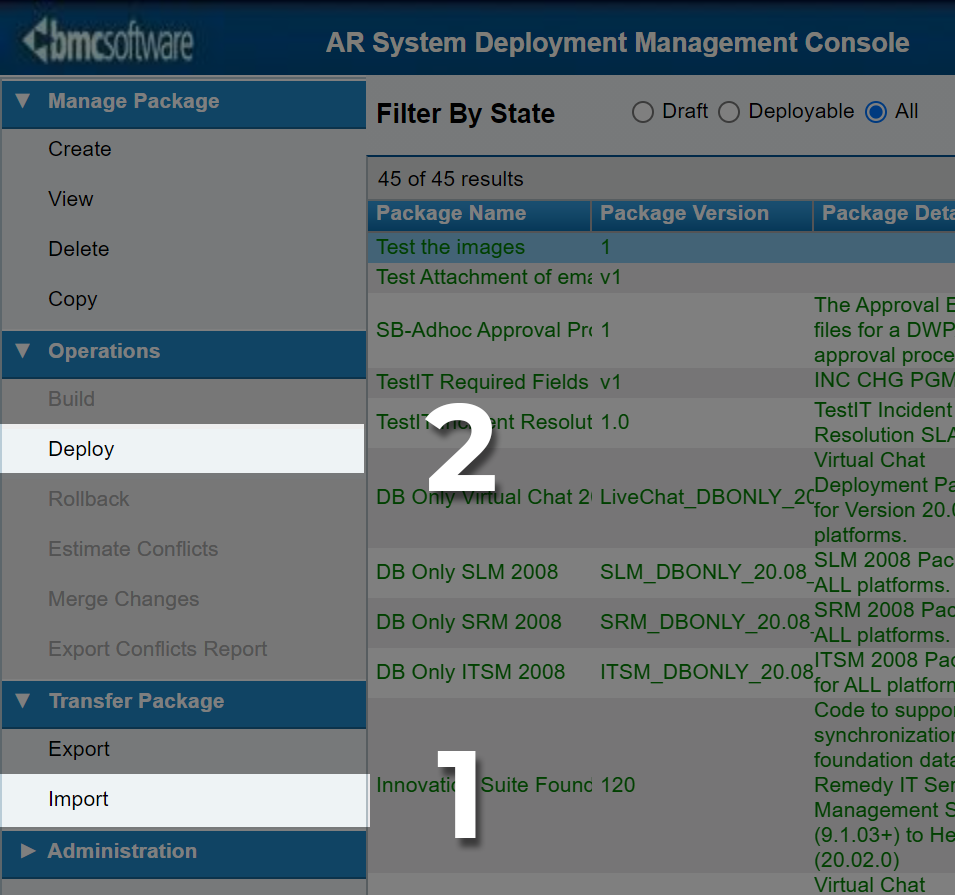
- On the ITSM target instance, open the Deployment Management Console
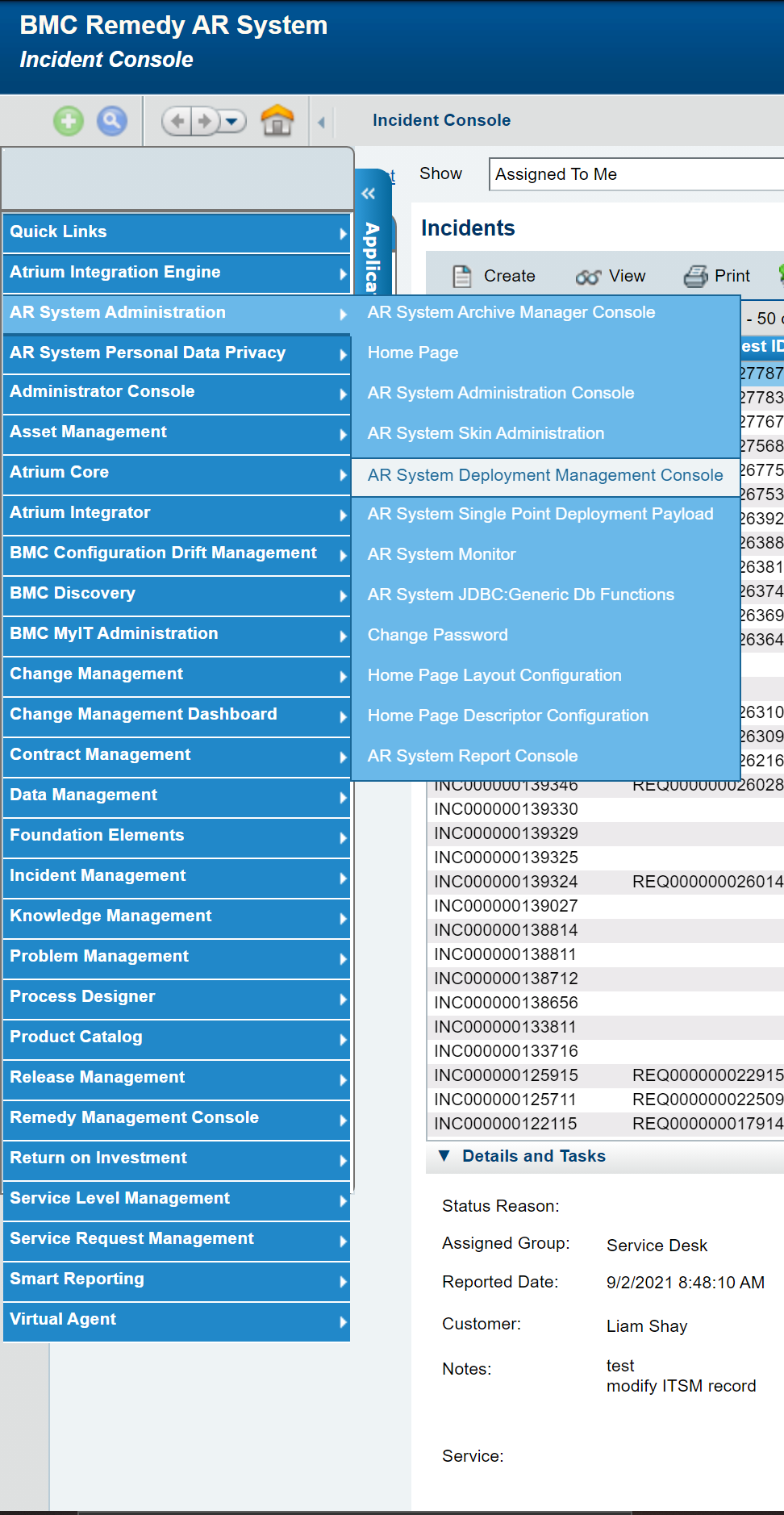
- Using the Deployment Management Console
- Import the zip file downloaded in Step 1
- Deploy the imported package
- Confirm the installation by verifying SB-Adhoc exists in Approval Administration Console
Installing the Partner IT - Work Order Workflow
- Download PartnerIT_WorkOrder.zip
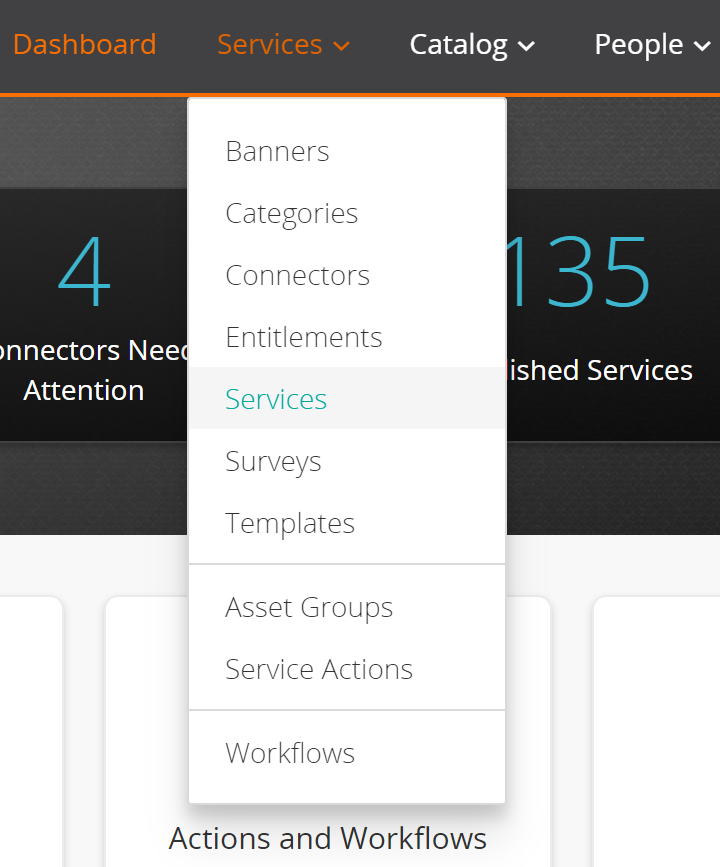
- On the DWPA target instance, go to Services/Services
- Select
Import From Fileand select the file downloaded in the previous step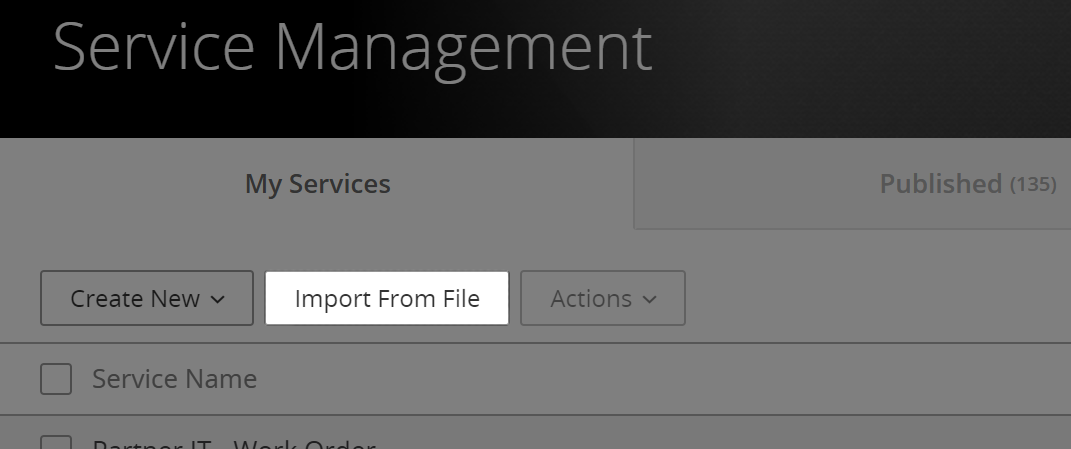
- In the Import Handling dialog, choose to preserve srouce attributes and overwrite existing workflows, then click
Confirm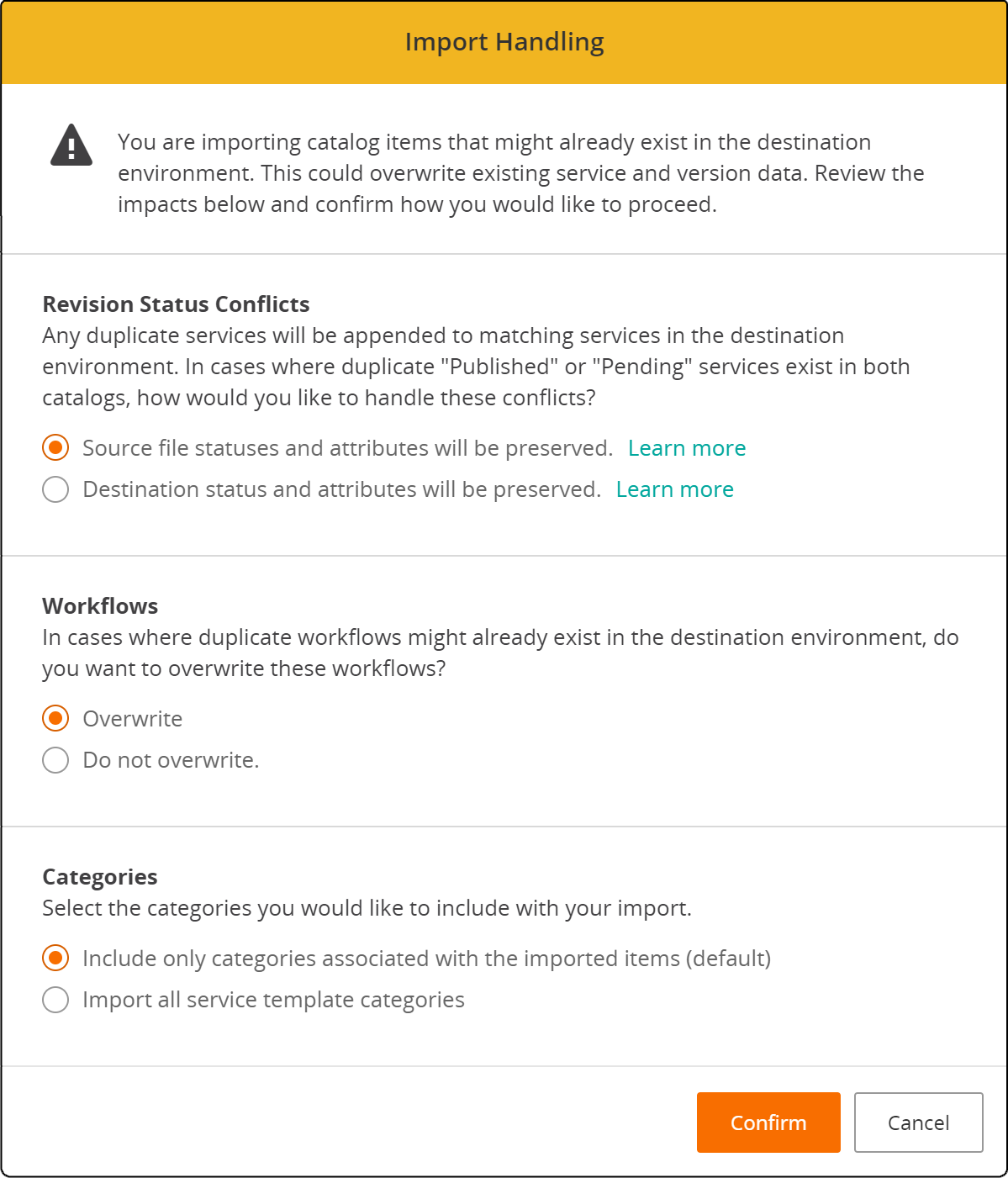
- Confirm success by viewing
Partner IT - Work Orderin DWPA Services.
 Do not publish the service. There is no need to publish the Partner IT - Work Order service in order to use the related workflow.
Technical Workflow

Click to view full-size Work Order workflow
Stage 1 - Summary
Sets the Summary on the Work Order
- Blank - takes Summary from the work order template
- Value - value is checked for 100 character limit. If greater than 100 characters, the first 97 characters are kept and an ellipsis (...) is appended.
Stage 2 - Description
Sets the Notes (Description field) of the Work Order
- Blank - Description is constructed using the Question and Answers provided
- Value - Used as the Description/Notes value
Stage 3 - Manager Approval
Bypassable by setting ByPass Manager Approval to "true"; otherwise the resulting Work Order requires management approval. If the property is left blank, the manager approval runs by default.
Stage 4 - Adhoc Approval
The adhoc approval process provides a mechanism to obtain an approval from a user determined by workflow, lookup or, while not recommended, hard-coding. This is often used for application owner or business approvals.
- Bypassable by setting ByPass Adhoc Approval to "true"; otherwise the resulting Work Order does not require adhoc approval. Not setting a value bypasses adhoc approval. This differs from the Manager Approval whereas no value runs the manager approval, no value for bypassing adhoc approval will not run adhoc approval.
- If adhoc approvals are used then the
Adhoc Approverproperty must be set with the value of theRemedy Login Idof the approving user.
Stage 5 - Details/Build Input Sets
Properties Details Value xx - <variable type> map to Build Input Sets constructed to populate the Details tabs of the Work Order. These should match the values expected in the Work Order Template.
Stage 6 - Create the Work Order
The final step creates the Work Order using the values supplied in the previous steps and values used from the Work Order Template.